Troubleshooting · Error Codes
Err 502: Bad Gateway or LibreOffice Calc Error?
Guide details
- Written by
- Truly Helpful Guides
- Published
- Last updated
- Sections
- Topics
On this page5 sections
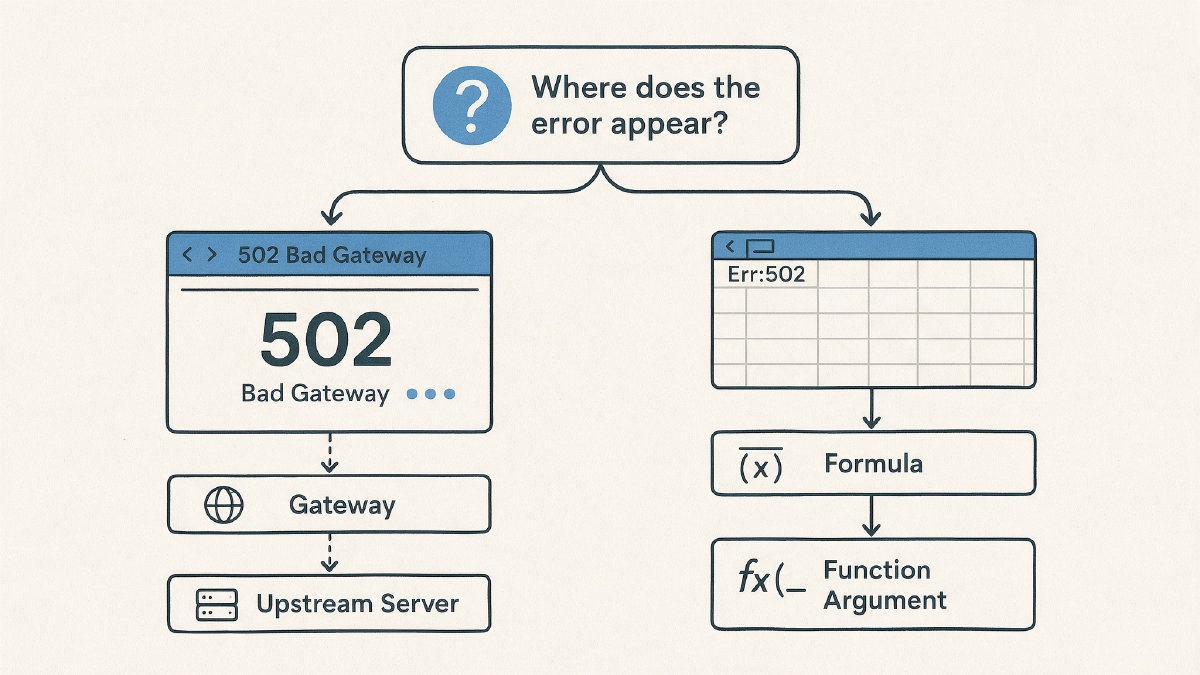
In the context of computing, the phrase “502 Bad Gateway” is often a status code from the web server itself. But what if you see something like Err:502? In that case, you might be in LibreOffice, specifically in LibreOffice Calc. That’s not the same thing.
A quick way to tell which problem you’re having is to look at the text that comes after it. If it’s “Bad Gateway,” then you can likely ignore whatever happened in the spreadsheet. You’ll probably find this error when accessing some kind of web app or browser, either via your browser or another web-based interface, such as Google Docs, etc. If it’s instead an “Err:502” then you’ll want to inspect the formula and perhaps check out the documentation for the specific function that’s throwing the error.
What does HTTP 502 mean?
If you encounter a 502 Bad Gateway message (or simply “502”), it’s because a gateway/proxy received an invalid response from an upstream server in its request chain.
In other words, the gateway or proxy is working as the middle server in the chain, but the upstream server didn’t give it a valid response to pass along.
It’s important to distinguish a 502 from something like a typo. A typo would normally produce a 404 Not Found page, for example. Similarly, a standard webpage error isn’t going to be represented by a 502 Bad Gateway response.
How can I fix a 502 Bad Gateway error on my browser?
There are a number of checks you can perform. Some may work for you and others will not:
Try again later. Maybe the website is down temporarily.
Check whether other people can view the site without error. You might have a setup-specific networking issue.
Turn off your firewall or antivirus, then try again. It’s possible that one of these tools could be interfering with communication between you and the webserver.
If you’re using a proxy server, turn that off and try again. Sometimes the proxy is where the problem lies.
Make sure that your DNS settings are correct. The wrong DNS could point you to an incorrect IP address.
If none of these things help, contact your site support team or administrator. They can check the server-side configuration.
You won’t always get an instant answer. If the problem affects many users, then you might just have to wait until the problem goes away.
You should also understand that you’re unlikely to solve the issue unless you have access to the webserver or upstream services. If the problem occurs on your own network, such as your home network or office network, then you can take action. However, if the problem occurs for everyone else, then you’ll need someone else to solve it.
So what’s the difference between a 502 error and a 504 Gateway Timeout error?
The distinction is pretty simple. One indicates that the upstream server failed to respond with anything useful; the other indicates that the upstream server didn’t respond within a time limit.
Why am I getting an Err:502 error in LibreOffice?
Unlike the above examples, where the “502” indicates an HTTP error, an Err:502 in a Calc formula is not an HTTP status code. Instead, LibreOffice provides the ability to calculate formulas and functions based upon values stored inside of cells. Therefore, a function argument must be valid — or else the function will return an error.
LibreOffice has an official definition for the error, known as the “502 Invalid argument” error. According to the LibreOffice documentation:
Function argument is not valid
This function returns the square root of the given number. This function is available since LibreOffice 3.8.
=SQRT(number)
number: a real number greater than or equal to zero.
Note: If the number is negative, this function returns an error value.
For example, =SQRT(16) returns 4. If the value of number is negative, such as -16, then the function returns an invalid-argument error (Err:502). The IMSQRT function can be used for imaginary numbers.
Therefore, the “502” error code here refers to an invalid argument passed to the function.
One common place where people see an “Err:502” error in LibreOffice is in the VLOOKUP() function. In Excel, VLOOKUP searches for the lookup value in the first column of a range and returns a specified column from the same row. However, the syntax is slightly different from Excel to LibreOffice, so let’s explore it a bit more.
The function syntax is similar to Excel:
=VLOOKUP(lookup_value, table_array, col_index_num, [range_lookup])
However, LibreOffice counts columns within the selected range rather than within the whole sheet, which can cause some confusion. For example, suppose you had a single-column range (like Sheet1.$A$2:$A$27) but asked VLOOKUP to return column 3. That would be invalid because the range contains only one column. To return the third column, the range would need to include columns A through C, such as Sheet1.$A$2:$C$27. The lookup is always on the first column of the given range, and the index argument identifies which column within that range to return.
Let me know if you need more information about what causes this problem or how to fix it.
So what now?
When troubleshooting, you’ll want to ask yourself two questions: Is this an issue related to the web/server workflow? Or is it an issue that you can investigate in the context of LibreOffice?
If it’s the former, then you’ll have to walk through the steps above to troubleshoot any potential issues. On the other hand, if you’ve identified a particular cell or formula that contains an “Err:502” error, you’ll need to go back to that formula and review each of its arguments individually.