Troubleshooting · App Fixes
How to Delete Your Telegram Account Permanently
Guide details
- Written by
- Truly Helpful Guides
- Published
- Sections
On this page5 sections
There are several ways you can delete your Telegram account permanently. One way is to simply uninstall the app or remove it from your phone’s browser and computer, but that doesn’t mean the account itself is deleted. The same goes for temporary deactivation. To permanently delete a Telegram account, you’ll need to go through a specific process.
In short, deleting a Telegram account permanently is a manual action that takes place in the browser, not within the app itself. It involves logging into Telegram via a browser, visiting a particular page, and confirming that you wish to have your Telegram account permanently deleted. There is also an auto-deletion option if you want the deletion to happen automatically when you leave it inactive for a period of time.
Before confirming the deletion, however, there’s some information that needs to be set aside. You should know what’s in your Telegram account before proceeding, as once it is deleted, it’s gone forever.
Deleting a Telegram account
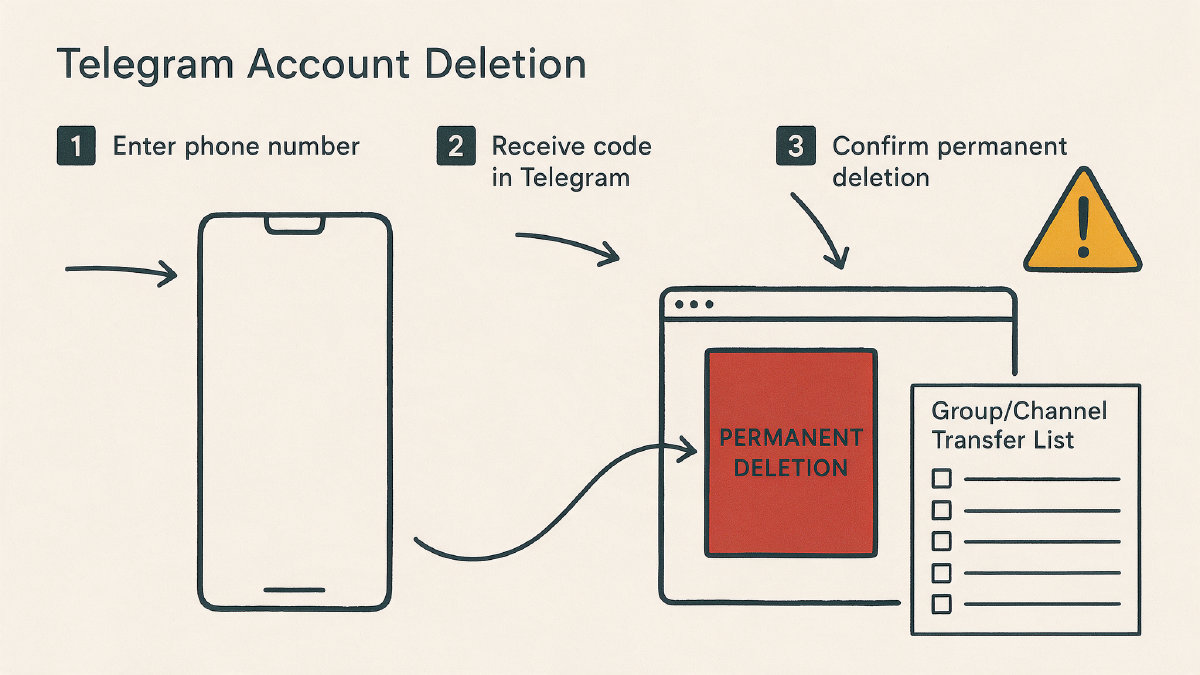
To delete your Telegram account permanently, log into your Telegram account via a web browser.
On that page, enter the phone number linked to your account, then enter the confirmation code that’s sent to your Telegram app on your phone or computer.
Once logged in, click “Delete My Account.” This is where you’ll find links for more information. For example, the mobile version of Telegram will lead to the FAQ on the desktop site instead. However, they all lead to the same destination: the page where you confirm whether you want to delete your account.
At this point, there is no way to undo this action, so take care.
Telegram’s deactivation flow includes two steps:
Delete My Account
Yes, delete my account
Depending upon the version of Telegram you use, these labels may vary slightly. Either way, they represent the same choice.
When do I delete my Telegram account?
The only time you should consider permanently deleting your Telegram account is when you don’t need access to it any longer. When you delete a Telegram account, the account itself is removed. The data and content associated with that personal account are also deleted.
For example, the following items will be removed:
Your personal data
All chats
Photos, videos, and voice messages
Contacts
Any other content associated with your Telegram account
Groups you own won’t be removed automatically either. If you want to ensure that groups aren’t around any longer, then you must delete them or transfer their ownership to someone else.
Similarly, channels you’ve created will also remain unless you explicitly delete them.
If you choose to permanently delete your Telegram account, you won’t be able to recover it later. However, you may re-register using the same phone number later, which will essentially create a fresh start without any of the prior information being restored.
Should I change my Telegram phone number instead?
If you’re only planning on changing your phone number, then you probably shouldn’t delete your Telegram account entirely. Why? Because you might still want access to your old chats and contacts. Changing your number won’t affect those.
Telegram has built-in functionality to allow you to change your number. Here’s how:
Open the app, then tap Settings → My Profile.
Tap your current phone number, then select Change number.
Follow the prompts to confirm that you’d like to switch to a new phone number.
Changing your number preserves all your information. You can always restore it if needed.
Do I want Telegram to automatically delete my account after a period of inactivity?
Some people prefer to delete accounts permanently, but others would rather have them deleted after a certain amount of time has passed. While this isn’t something you’ll see directly in Telegram, it’s possible.
Within Telegram’s Settings menu, there is an option called Privacy and Security. Under that, there’s a setting called Delete my account.
Here you can enter the number of months you’d like to wait until your account is deleted. If you choose to stay logged in for more than that length of time, your account will remain active. Otherwise, it will be deleted.
You can set the timer by choosing a number of months, with a minimum period of one month. Note, however, that the actual label for the field may differ by version of Telegram, and so too may the period of time it refers to.
So, when should I delete my Telegram account?
You should delete your Telegram account permanently if:
You don’t plan on accessing Telegram any longer
You want to begin again from scratch
Otherwise, deleting your account is not necessary. Instead, you could choose to simply uninstall it or change your phone number.
However, deleting a Telegram account does require that you have access to your phone number. Additionally, you’ll need to log into your account within the Telegram app to get the confirmation code required to proceed with permanent deletion.